Workspace & boards
The workspace file declares the shared vocabulary — columns, tags, link types, users, settings. Boards are saved views over that vocabulary: they pick columns and card types, optionally enforce transitions and WIP limits, and carry presentation hints. This page covers both files. Card type schemas have their own page.
The workspace definition
File: definitions/workspace.json (JSON only).
{
  "id": "demo",
  "name": "Demo workspace",
  "columns": [
    { "id": "backlog", "name": "Backlog" },
    { "id": "todo", "name": "To Do" },
    { "id": "in_progress", "name": "In Progress" },
    { "id": "review", "name": "Review" },
    { "id": "done", "name": "Done" }
  ],
  "tag_set": ["urgent", "bug", "feature"],
  "link_types": [
    { "id": "depends-on", "name": "Depends on", "type": "directional" },
    { "id": "blocked-by", "name": "Blocked by", "type": "directional" },
    { "id": "related", "name": "Related", "type": "bidirectional" }
  ],
  "settings": {
    "enforce_transitions": false,
    "strict_fields": true,
    "tag_policy": "locked",
    "default_user": "local-dev",
    "default_board": "engineering"
  }
}
- Columns are the only valid
statusvalues, by columnid(APIs usein_progress, never "In Progress"). Array order is the lane order. - Link types are the relation vocabulary. Optional
source_types/target_typesrestrict which card types may be linked; mismatches are rejected with the valid set echoed. - Users are registered, assignable owners. Event actors may be arbitrary strings — see users & auth.
- Reload:
cards reload(orPOST /v1/workspace/reload) reloads definitions on a running server;cards serve --watchreloads on file change. Reloading never migrates existing cards.
The board definition
File: definitions/boards/<board_id>.json. The definition on the left draws
the lanes on the right:
{
  "id": "engineering",
  "columns": ["backlog", "todo",
    "in_progress", "review", "done"],
  "card_type_ids": ["programming-task",
    "research-goal", "api-task"],
  "settings": { "enforce_transitions": true },
  "wip_limits": { "in_progress": 3 },
  "transitions": {
    "todo": ["in_progress"],
    "in_progress": ["review"],
    "review": ["done", "in_progress"]
  },
  "presentation": {
    "style_field": "kind",
    "card_preview": {
      "programming-task": ["branch"],
      "research-goal": ["hypothesis"]
    }
  }
}
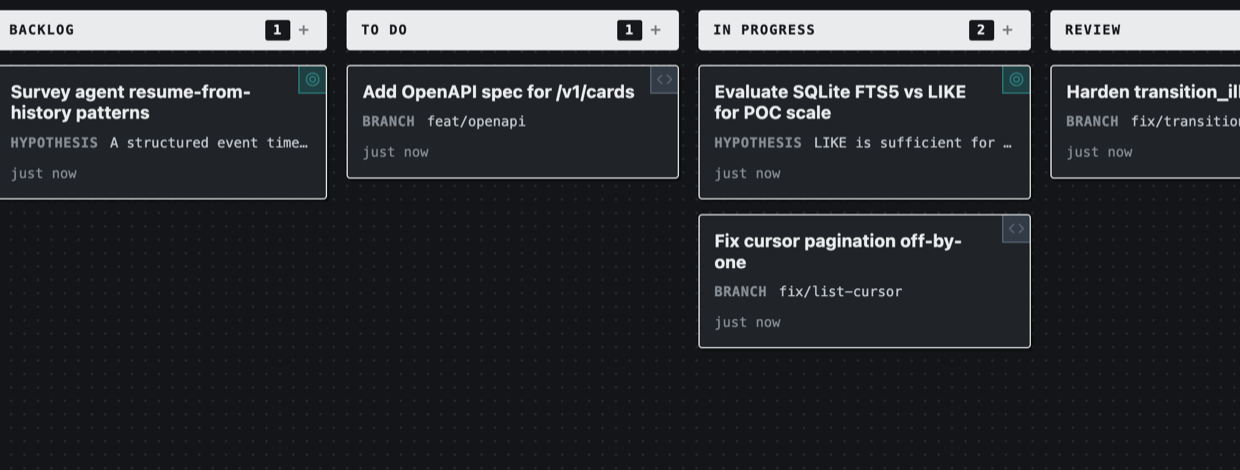
Boards do not own cards — card_type_ids and columns scope which workspace
cards appear, and an optional default_filter (query-DSL) is a hard boundary
callers can narrow but never widen.
Status and transitions
Every card has exactly one status, always a workspace column id. A status
change passes three layers, each only adding restriction:
- Column validity — the id must exist in
workspace.columns. - Type subset — if the card type sets
allowed_columns, the new status must be in it. - Transition graph — only when enforcement is on.
Enforcement is opt-in, at either scope:
| Scope | Config | Effect |
|---|---|---|
| Workspace | settings.enforce_transitions: true |
Default for all boards |
| Board | settings.enforce_transitions + transitions |
Board-specific graph |
When off (the default), any valid column can move to any other. When on, the
transitions map lists each status's allowed next statuses. Both keys and
values must be this board's columns (a subset of workspace.columns) —
load rejects edges that name workspace-only ids, and
transition_illegal.valid_options only echoes board column ids. A rejected
move is a structured error echoing the allowed targets:
$ cards patch b7652dee --status done --version 2
cards: transition_illegal (status): Status transition not allowed by board transitions. [valid: in_progress]
Legal changes emit status_changed events. Note that depends-on /
blocked-by links never gate status changes automatically — query
blocked=true or filter in take-next instead.
WIP limits and monitors
{
  "wip_limits": { "in_progress": 3 },
  "monitors": {
    "alert_when_empty": ["todo"],
    "emit_rejections": true,
    "max_time_in_status": { "review": "168h" },
    "idle_after": "72h"
  }
}
| Field | Fires | Meaning |
|---|---|---|
wip_limits |
wip_exceeded / wip_cleared |
Cap per column |
alert_when_empty |
lane_drained / lane_refilled |
Watched columns crossing zero |
emit_rejections |
transition_rejected |
Off by default (noise) |
max_time_in_status |
status_timeout |
Column → max duration ("168h") |
idle_after |
card_idle |
No mutation for the duration |
Condition events are ephemeral (live bus/SSE/hooks only) unless listed in the
workspace's settings.persist_conditions, which escalates them to the durable
log.
Current state is queryable anytime — cards breaches, GET /v1/breaches, or
the MCP breaches tool (using Cards).
Presentation
UI hints only — presentation never affects validation or writes:
card_preview— which fields show on the card face, per type.style_field— an enum field whoseoption_themesdrive the card's accent color and icon.lane_sort— default within-lane order (-fields.priority,updated_at, …); validated at load, overridable per request with?sort=.filters— named saved filters the board renders as chips;"me"resolves to the viewing actor.theme— see making themes for board-level theming.
Relating cards
Two mechanisms, one vocabulary (workspace.link_types):
card_linkfields — relations that are part of the type's data model (e.g.assigned_printer), validated on write.- The
linkscollection — edges added during work (cards link add …), historied aslink_added/link_removed.
Query the graph with blocked=true (cards with an outgoing
blocked-by/depends-on to an unfinished card), has_link, and
link_target.
Checklist for a new board
- Add or reuse columns in
workspace.json. - Add any link types you need.
- Create or reuse a card type under
definitions/card-types/. - Create the board JSON:
card_type_ids, optionaltransitions+wip_limits,presentation.card_preview, savedfilters. - Register users (humans and agents) before assigning owners.
- Verify with
cards workspace showbefore pointing agents at it.
Views (proposed)
A declared View type (domain URLs like /orders/:order_id/parts) exists in
the core but has no routes or CLI yet —
built vs proposed tracks it.
Related
- Card definitions — field schemas and versioning.
- Card type examples — complete worked schemas.
- Using Cards — operating on cards from CLI, HTTP, and MCP.
- Query DSL — the filter grammar used by
default_filterand saved filters.